All Things Around Maximo · Architecture Notes
IBM Maximo Application Suite runs as stateless containers — but some of its most important data can't be. Here's how you configure persistent volumes from MAS Core, and why each field on that screen is really answering a technical requirement, not filling in a form.
There's a screen in Maximo Application Suite that looks trivial and isn't. You enable a capability, and before it will start, MAS asks you to "configure persistent volume details" — four fields. It's easy to type something plausible and move on. Don't: every field is a decision about how a piece of your Maximo estate survives, scales, and shares data.
Why MAS needs persistent storage at all
Containers are ephemeral by design. Kill a pod and everything on its local filesystem goes with it — exactly what you want for a stateless web tier, and what makes MAS easy to scale and upgrade.
But several MAS capabilities produce data that must outlive any single pod:
- Attachments (Doclinks) — documents, photos, drawings and manuals linked to assets and work orders.
- Server logs — needed for diagnostics and audit long after the pod that wrote them is gone.
- Integration messages (JMS) — in-flight messages on continuous queues that must not be lost across a restart.
- BIM models — large Building Information Model files.
- Application Configuration — the Suite's own server-side configuration workspace, new in MAS 9.x.
For each, MAS provisions a PersistentVolumeClaim (PVC) — a durable slice of cluster storage that stays put while pods come and go. MAS Core is where the Suite's own persistent storage is declared (Application Configuration); each application — Manage most of all — extends the same model with its own volumes.
The four fields, and the requirement behind each
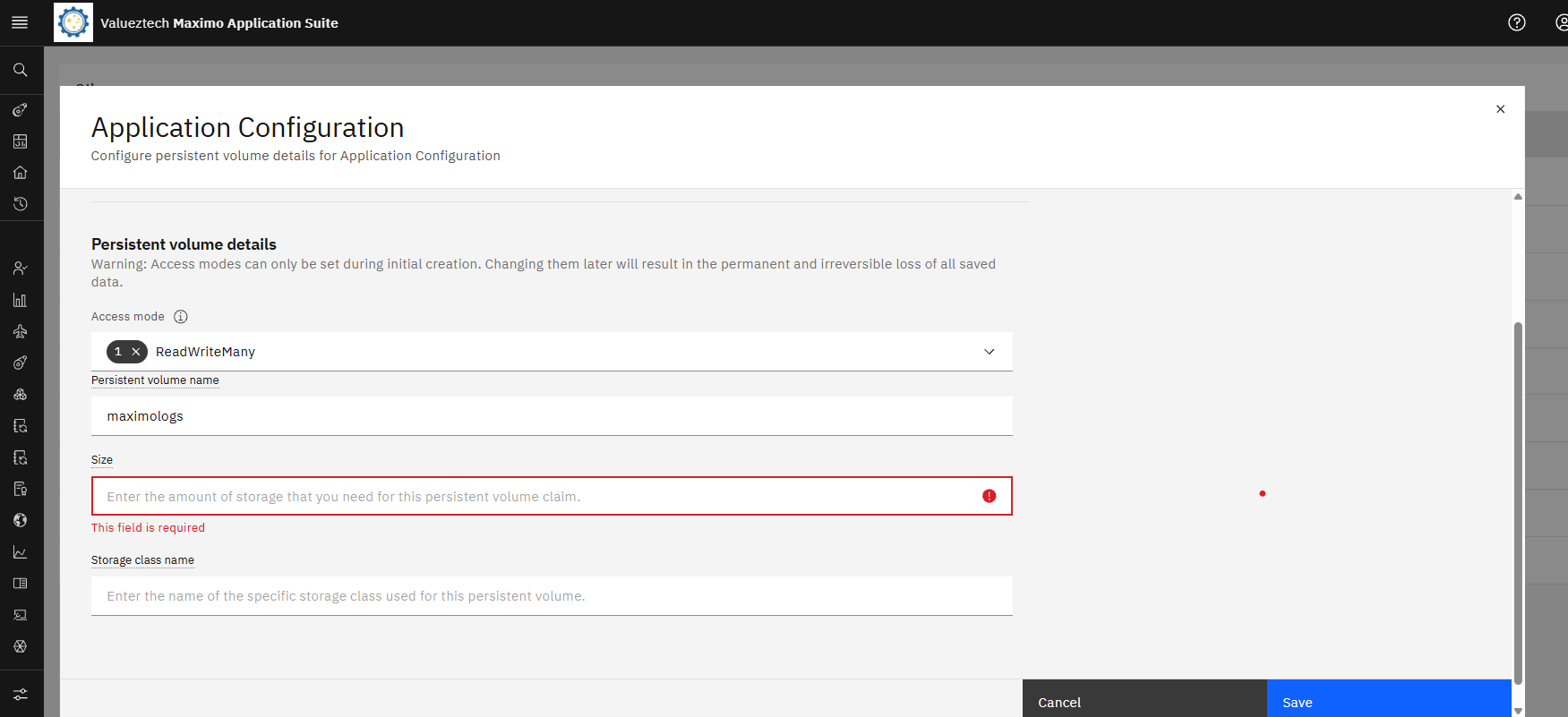
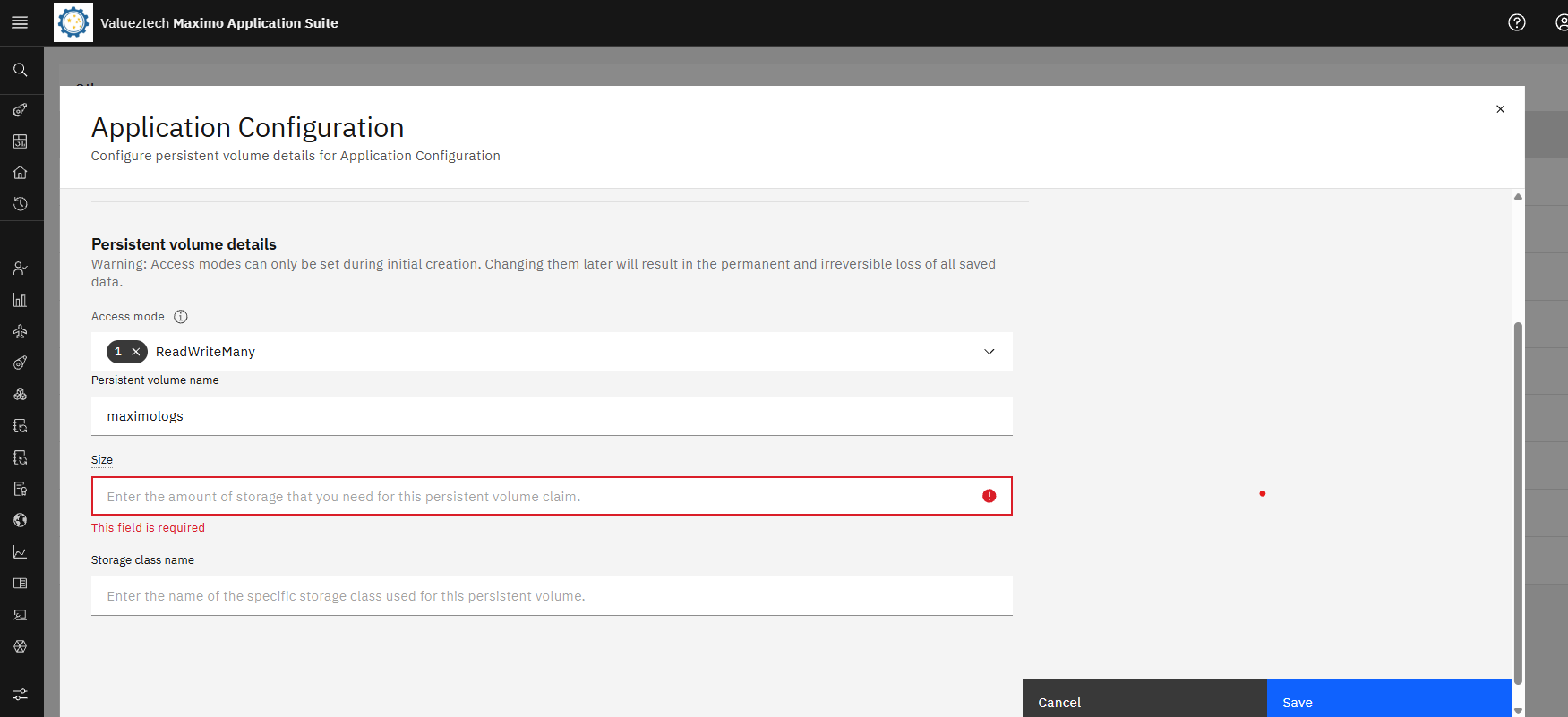
The MAS Core persistent-volume dialog. Four fields — access mode, volume name, size and storage class — each one a decision, not a default. (Shot taken mid-configuration: Size is still required and the storage class not yet set. The access mode shows ReadWriteMany here, before it was corrected to ReadWriteOnce — the right choice for this single-node cluster, as explained below.)
| Field | Looks like | Really means |
|---|---|---|
| Access mode | A dropdown | How many pods — and how many nodes — must read and write this at once? |
| Volume name | A label | The PVC identity (e.g. maximologs, doclinks). |
| Size | A number + Gi | How much will this data grow, and how fast? |
| Storage class | A name | Which storage backend — and therefore which capabilities — provisions it? |
Get those four right and the capability starts and stays reliable. Get them wrong and, at best, the volume never binds; at worst, you commit to an access mode you can't change without data loss. Here are the three that carry real weight.
Decision 1 — Access mode: the sharing requirement
The field people underestimate most, because on a single node it never bites.
- ReadWriteOnce (RWO) — mountable read-write by pods on a single node.
- ReadWriteMany (RWX) — mountable read-write by pods across many nodes at once.
The question it answers: does more than one node need to write this simultaneously?
Take Doclinks. On a multi-node cluster, Manage runs several server bundles — UI, cron, MIF, report — potentially on different worker nodes, and every one must see the same attachments. Upload a document on the UI pod and the report pod has to read it. That is the textbook case for ReadWriteMany. Provision it as RWO on a multi-node cluster and your second Manage pod won't even schedule — it can't mount a volume already held read-write on another node.
On a single node, the question dissolves: every pod lands on the same node, so RWO behaves exactly like RWX. RWX would buy you nothing — and with node-local storage it can't be satisfied anyway.
⚠️ The trap that makes this urgent — Access mode is set once, at creation, and is immutable. MAS spells it out: "Access modes can only be set during initial creation. Changing them later results in the permanent, irreversible loss of all saved data." There is no live migration — choose for your target topology on day one, because fixing it later means deleting the PVC and everything on it.
Decision 2 — Storage class: the topology & performance requirement
The storage class decides which backend provisions the volume — and the backend decides what's possible.
- Node-local block storage — e.g. the LVM Storage Operator (topolvm), which on single-node OpenShift surfaces as
lvms-vg1. Fast, simple, the natural SNO default — but fundamentally ReadWriteOnce only. A logical volume carved from one node's disk can never be shared across nodes. - Shared filesystem storage — OpenShift Data Foundation (ODF) →
ocs-storagecluster-cephfs, or an NFS-backed class. These are what make ReadWriteMany real.
Access mode and storage class are joined at the hip: if a requirement needs RWX, you must point it at a class that can do RWX. Asking lvms-vg1 for ReadWriteMany isn't a small mistake — the volume will never bind.
Decision 3 — Size: the capacity & growth requirement
- Doclinks and BIM grow with the business — every attachment, every model file. Size generously and monitor; an attachments volume out of space stops users uploading.
- Logs are churn, not accumulation — they rotate. Size for the rotation window and diagnostics, not forever.
- Application Configuration is small and stable — a few gigabytes is plenty.
Grounded example: the MAS Lab volumes
Here's the actual persistent-volume layout from our single-node MAS 9.2 lab — five capabilities, five requirements, one storage class:
| Volume | Serves | Why it must persist | Lab size | MNO wants |
|---|---|---|---|---|
maximologsCore | Application Configuration workspace | Survive restarts & upgrades | 5Gi | RWX if scaled |
doclinksManage | Attachments / documents | Shared by every Manage pod | 20Gi | RWX |
maximo-logsManage | Server logs | Diagnostics & audit after restart | 10Gi | RWX / per-pod |
jmsManage | JMS message store | In-flight integration messages | 20Gi | design-dependent |
bimManage | Building Information Models | Large shared binaries | 20Gi | RWX |
On a single node, all five are correctly ReadWriteOnce on lvms-vg1 — the right answer for SNO. Lift the same estate onto a multi-node cluster and Doclinks and BIM must become ReadWriteMany on CephFS or NFS, or Manage won't run multi-pod. Same screen, same fields — the topology changes the answer.
SNO vs MNO at a glance
| Single-node (SNO) | Multi-node (MNO) | |
|---|---|---|
| Storage class | lvms-vg1 (topolvm, local) | ocs-storagecluster-cephfs or NFS |
| Shared volumes (doclinks, BIM) | ReadWriteOnce | ReadWriteMany |
| Why | One node — RWX is pointless | Pods span nodes — volumes must be shared |
When it goes wrong, it goes wrong silently
One caution worth internalising, because it cost us an afternoon. MAS is operator-reconciled: an operator runs an Ansible reconcile to turn your PV settings into real Kubernetes objects. If a field is invalid — even a stray leading space in the storage-class name — the API server rejects the PVC, the reconcile fails, and the operator retries the same broken thing forever. The UI shows an endless "Running reconciliation" spinner and no error at all. The Suite can even still report Ready.
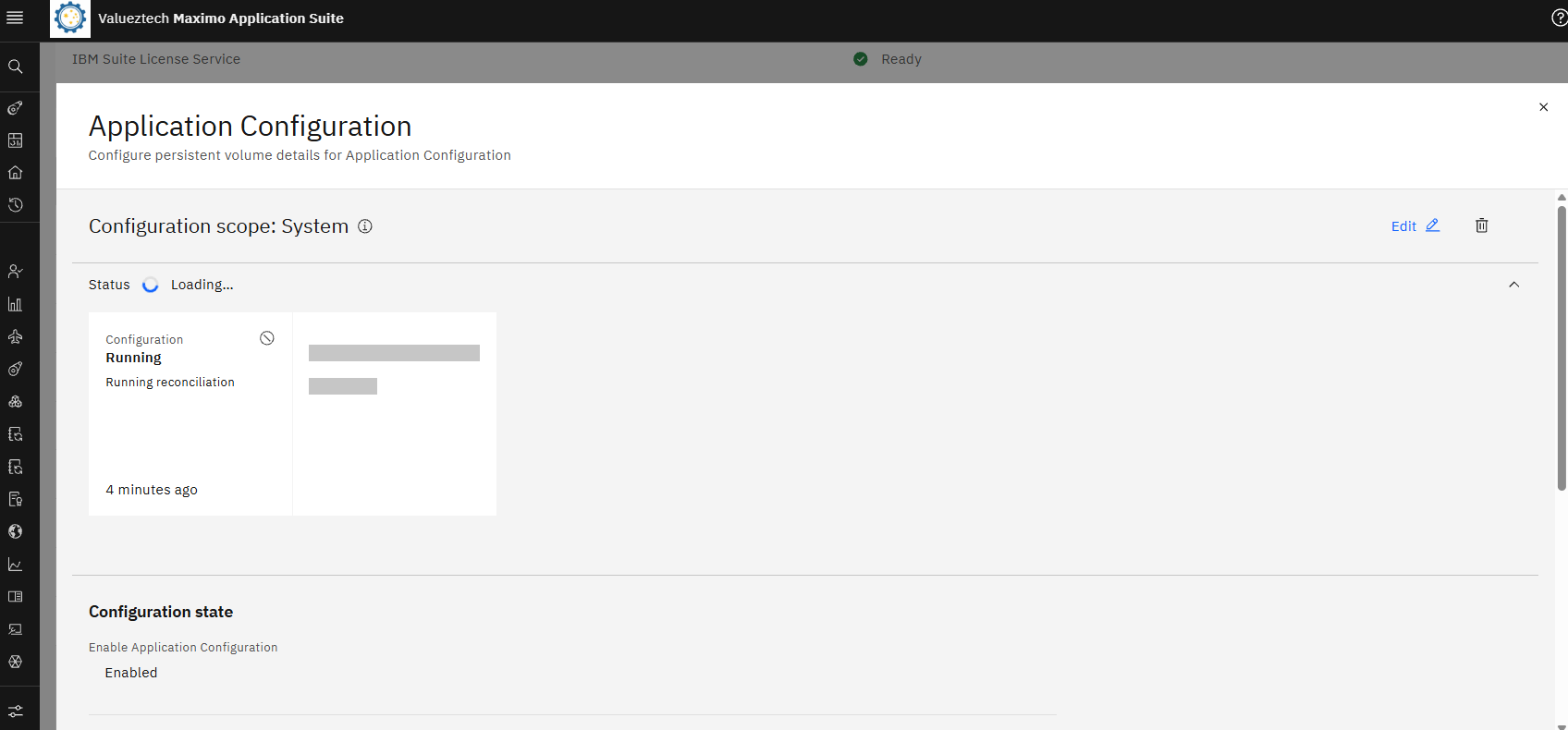
The symptom. Configuration "Running reconciliation" — a spinner that never settles, while IBM Suite License Service and the Suite itself report Ready. Nothing here tells you a PVC was rejected.
The truth is never in the UI. It's in the custom resource:
oc get appcfg <name> -n mas-<instance>-core -o jsonpath='{.status.conditions}'
That's where the operator records the real failure — a 422 Invalid, a bad storage class, a size it can't satisfy. When a MAS capability spins forever, read the conditions, not the spinner.
The takeaway
The persistent-volume screen in MAS Core isn't paperwork — it's where you decide how each part of your Maximo estate survives, scales, and shares its data. Four fields, four requirements:
- Access mode — the sharing requirement (and it's immutable, so choose for production topology now).
- Storage class — the topology & performance requirement (block vs shared filesystem).
- Size — the growth requirement (attachments balloon; logs rotate).
- Volume name — the identity you'll troubleshoot by.
Decide them deliberately, once, for the cluster you're actually going to run — and MAS storage becomes something you never think about again. Which is exactly what good infrastructure should be.
Valueztech runs an AI-first IBM Maximo and enterprise asset management practice out of Melbourne, helping utilities, water, energy and government operators architect, deploy and stabilise MAS on OpenShift — from single-node labs to production multi-node clusters. If you're sizing storage for a MAS rollout, or untangling one that's fighting you, that's exactly the work we do.
Biplab Das Choudhury
Founder & Principal Consultant, Valueztech · IBM Champion 2026 · IBM Silver Partner